Why Google Business Profile Matters for Texas Businesses
A complete and accurate Google Business Profile makes it easier for nearby customers to find, evaluate, and contact your business. When someone searches for a local service, compares options on Google Maps, or looks up your business name, the information in your profile can shape whether they call, visit your website, request directions, or choose another company.
For Texas small businesses, local visibility is not just about appearing in search. It is about giving customers clear, trustworthy information at the moment they are deciding who to contact. Your business name, categories, hours, services, reviews, photos, phone number, website, and service area should all accurately represent the business today.
Google Business Profile is free to manage, but it needs regular attention. An incomplete or outdated profile can confuse customers, create missed opportunities, and weaken the impact of your website, local SEO, and paid advertising.
Start With Accurate Business Information
The first priority is accuracy. Customers should see the same reliable information whether they find your business on Google Maps, your website, a local directory, or a social profile.
Review these core profile details:
- Business name: Use your real-world business name exactly as customers know it. Do not add cities, services, slogans, or extra keywords unless they are part of the official name.
- Primary category: Choose the category that most accurately describes your primary business activity.
- Additional categories: Add only categories that represent services you genuinely provide.
- Address or service area: Use a real, eligible business address when customers can visit the location. Service-area businesses should define the areas they serve without listing a virtual office or an address they do not operate from.
- Phone number: Use an active number that customers can reach and keep it consistent across your website and directories.
- Website: Link directly to the most relevant page on your site, usually the homepage or an important location page.
- Hours: Keep regular, holiday, seasonal, and special hours current.
- Services: Add accurate service details that help customers understand what you offer.
- Business description: Write a clear, factual overview of what the business does, who it serves, and what makes it relevant locally.
This information should be reviewed whenever your contact details, hours, service area, staff, location, or services change.
Choose Categories and Services Carefully
Categories help Google understand the type of business you operate and the searches where your profile may be relevant. They are not a place to target every possible keyword or every nearby city.
Choose one primary category that reflects your main business activity, then use additional categories only for services that are genuinely part of the business. For example, a company that primarily provides roofing should not choose unrelated categories just because they seem popular or competitive.
The same principle applies to service areas and service descriptions. Be specific, accurate, and customer-focused. A profile that clearly represents a real business is more useful than one loaded with broad claims that do not match what customers experience.
TXPAGES provides local SEO and listings management for Texas businesses, including Google Business Profile optimization, citation management, review strategy, and local search improvements.
Make Your Profile Easier to Trust
Customers often make quick decisions based on what they see in a local search result. A profile with current photos, clear business details, responsive review management, and accurate services gives people more confidence to take the next step.
Use Current, Authentic Photos
Add photos that help customers recognize your business and understand what you offer. Depending on your business, this may include your storefront, team, vehicles, completed work, products, office, equipment, menu items, or service process.
Avoid relying entirely on generic stock photos. Real images set accurate expectations and help a local business look more credible. Update them periodically so the profile reflects your business as it is now.
Manage Reviews Professionally
Reviews can influence whether a customer contacts your business, but the goal should be genuine feedback—not manufactured ratings. Ask satisfied customers for an honest review after a completed service, purchase, or positive experience.
Respond to reviews consistently and professionally. Thank customers for positive feedback. For negative feedback, acknowledge the concern, remain respectful, and move detailed resolution offline when appropriate. Never post fake reviews or offer incentives that require customers to leave a positive review.
Keep Business Updates Relevant
Use profile updates when you have useful information to share, such as seasonal hours, a new service, an event, a special offer, a helpful resource, or an important business update. Do not post simply to add keywords. Every update should give a customer a reason to learn more or take action.
Keep Your Listings Consistent
Your Google Business Profile is important, but customers may also find you through local directories, map platforms, review sites, industry-specific listings, and social profiles. Your business name, address, phone number, website, and hours should be accurate and consistent wherever your company appears.
Inconsistent listing information can cause customer frustration. A person may call an old phone number, drive to the wrong address, or question whether a business is still active. Cleaning up outdated listings helps create a stronger and more reliable local presence.
TXPAGES helps Texas businesses manage local citations and listings as part of its local SEO services. This work supports clearer customer information across the online platforms that matter most.
Common Google Business Profile Mistakes
Avoid these common issues when managing your profile:
- Creating duplicate profiles for the same eligible location
- Using a business name that includes unnecessary keywords or cities
- Choosing categories that do not accurately reflect your business
- Listing an address, office, or service area that does not represent a real operating location
- Leaving old phone numbers, hours, websites, or services on the profile
- Ignoring customer reviews or responding emotionally to criticism
- Using fake reviews, misleading photos, or inaccurate offers
- Failing to update holiday hours, seasonal services, or business changes
- Sending customers to a website page that does not clearly explain the service they need
A clean, accurate profile is more valuable than a profile packed with inflated claims.
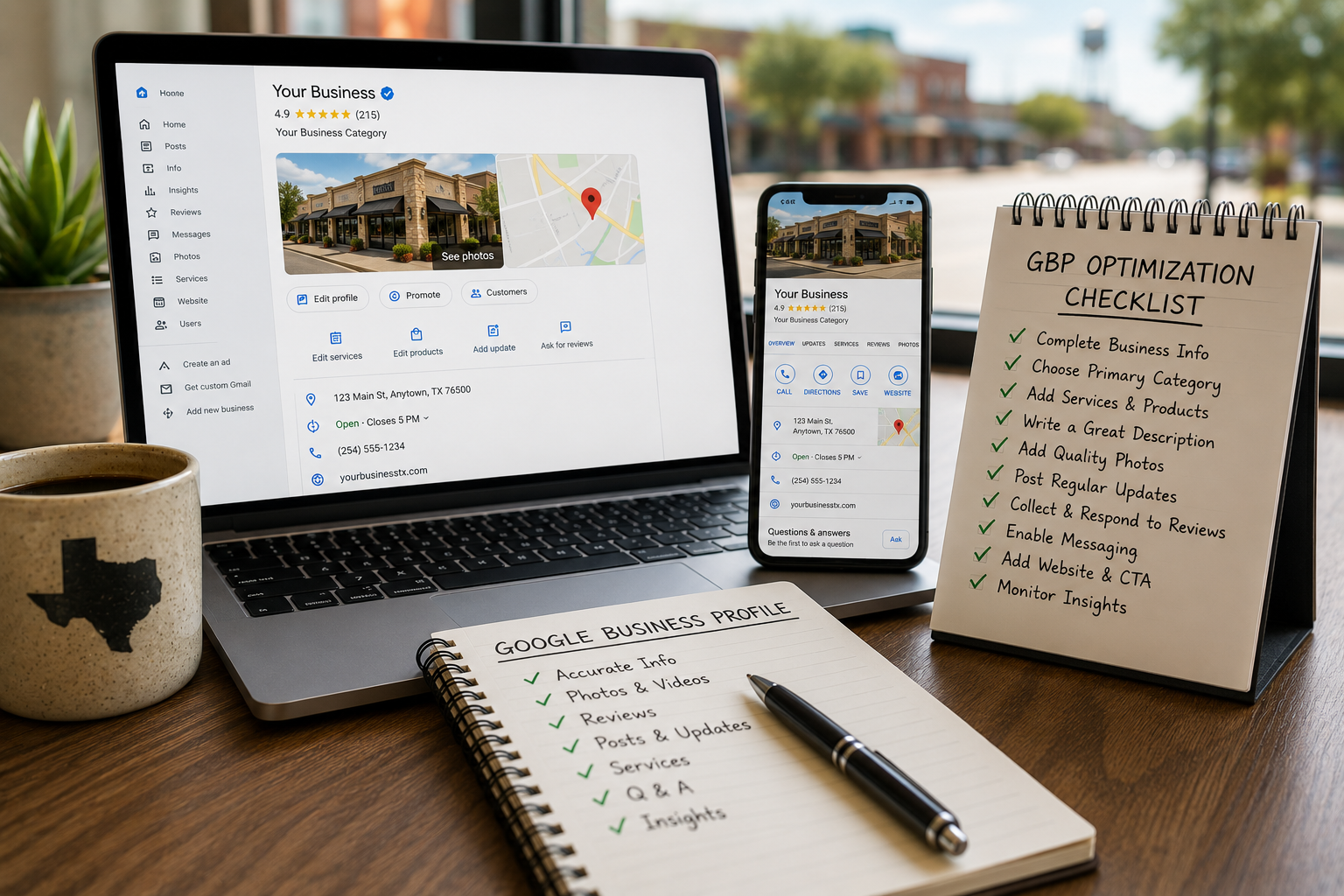
Practical Google Business Profile Checklist
Use this checklist before a busy season, campaign launch, website redesign, or local SEO push:
- Confirm your business name, phone number, website, address or service area, and hours are accurate.
- Review your primary category and remove any additional categories that do not represent real services.
- Check that your services, business description, and website link match your current offerings.
- Add recent, authentic photos that show your business, team, work, products, or location.
- Review recent customer feedback and respond to outstanding reviews professionally.
- Update special hours for holidays, seasonal changes, or temporary closures.
- Check important online directories for outdated or inconsistent contact information.
- Review profile insights and website performance to identify pages and services customers care about most.
- Make sure your website is mobile-friendly and gives local visitors a clear next step.
- Set a recurring schedule to review and update your profile throughout the year.
Support Your Profile With a Strong Website
A Google Business Profile can create visibility, but your website often does the work of turning interest into an inquiry, phone call, appointment, or sale. When a customer clicks through, they should find a fast, mobile-friendly page that clearly explains the service, location relevance, proof of experience, and how to contact you.
TXPAGES builds mobile-first websites for Texas businesses that support local SEO, paid campaigns, and customer conversion. Strong service pages and clear contact paths help make the most of the attention your Google Business Profile creates.
Get a Free TXPAGES Visibility Report
Before investing more time or budget into local SEO, understand what needs attention first. A TXPAGES Visibility Report can identify Google Business Profile gaps, local listing inconsistencies, website issues, service-page opportunities, content priorities, and competitive challenges affecting your Texas business.
Request your free TXPAGES Visibility Report to get a practical roadmap for improving your local visibility and helping more customers find the information they need to choose your business.